








Gumball Color-In Game - Bring Your Favorite Characters to Life with Colors!
Welcome to the Gumball Color-In Game! Get ready to unleash your artistic talents and add vibrant colors to the world of Gumball. In this exciting game, you'll have the opportunity to bring your favorite Gumball characters to life by coloring them in your unique style. Let your creativity shine!
Gameplay Overview
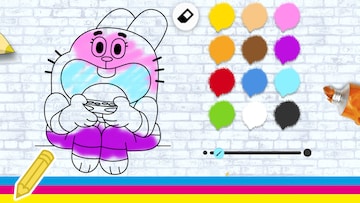
The Gumball Color-In Game lets you become the artist and gives you access to a variety of Gumball character coloring pages. Choose from Gumball, Darwin, Anais, and many other beloved characters from the show. Each character comes with their own intricate details and features, waiting for you to give them a splash of color.
Select your preferred coloring tools, such as a brush, pencil, or bucket, and pick from a wide range of vibrant colors to create your masterpiece. You have complete freedom to choose any color combination you desire, so let your imagination guide your choices.
Explore different coloring techniques and experiment with shading, blending, and highlighting to add depth and dimension to your artwork. Take your time and pay attention to the small details, from Gumball's signature spikes to Darwin's unique fish-like appearance.
Once you've finished coloring a character, you can save your artwork or share it with friends and family. Showcase your creativity and see how others interpret and appreciate your coloring skills.
Game Controls
Use the following controls to bring the Gumball characters to life with colors:
- Mouse: Select colors, choose coloring tools, and apply them to the character.
- Brush/Pencil Tool: Use these tools to add precise strokes and details to the character.
- Bucket Tool: Fill larger areas with colors quickly using the bucket tool.
- Undo/Redo: Correct mistakes or undo coloring actions with the undo/redo buttons.
Take your time, experiment with different tools, and let your creativity flow as you color your favorite Gumball characters.
Tips and Suggestions
Here are some tips and suggestions to enhance your coloring experience in the Gumball Color-In Game:
- Explore color palettes: Experiment with different color combinations to give the characters a unique and personalized appearance. Don't be afraid to try unusual or imaginative color choices.
- Add shading and highlights: Use lighter and darker shades of the same color to create shading and depth. Add highlights to certain areas to make them stand out.
- Pay attention to details: Take your time to color in the small details, such as facial expressions, clothing patterns, and accessories. These details bring the characters to life.
- Try different coloring techniques: Experiment with various coloring techniques, such as cross-hatching, stippling, or blending colors, to achieve different effects and textures.
- Share your artwork: Once you finish coloring, share your artwork with friends, family, or online communities. Celebrate your creativity and inspire others with your colorful interpretations.
Now, grab your virtual coloring tools and let your imagination run wild in the Gumball Color-In Game. Bring the Gumball characters to life with your unique colors and create stunning artwork!
